> ## Documentation Index
> Fetch the complete documentation index at: https://docs.onconsul.com/llms.txt
> Use this file to discover all available pages before exploring further.
# OAuth Connections
> Authorize Consul API actions on behalf of your users
OAuth 2.0 (Open Authorization) is the standard protocol for delegated
access. Rather than asking users to paste an API key, OAuth lets a
third-party application redirect the user to Consul, where they
explicitly consent to a set of permissions. The application then
receives an access token scoped to that user's account.
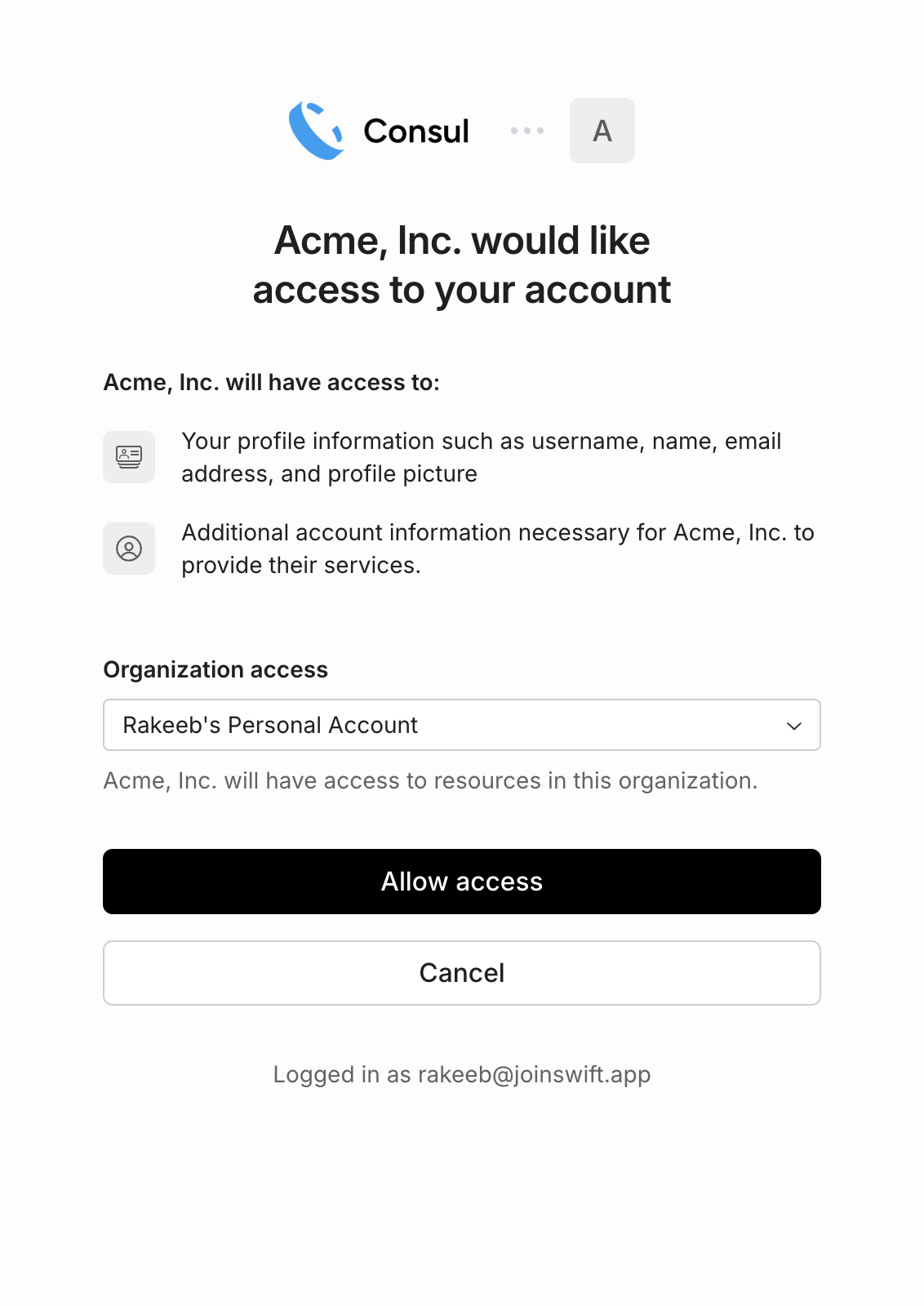
Consul's OAuth flow is hosted at **`auth.onconsul.com`** and powered
by [WorkOS Connect](https://workos.com/connect). For a thorough
primer on the protocol itself, see
[The Complete Guide to OAuth 2.0](https://workos.com/guide/the-complete-guide-to-oauth)
by WorkOS.
 ### What this enables
* **Embedded digital wallets.** Surface a user's Consul balance and
transaction history directly in your UI.
* **Checkout and payment acceptance.** Send and reconcile funds from
your users' Consul balances natively in your app.
* **Fiat deposits from your platform.** Trigger deposits into a user's
Consul balance from your platform without them leaving your app.
### Prerequisites
To act on behalf of Consul users, you need a Consul **Connect App**.
Register one from the **Developers → Connect** section of the
[dashboard](https://dashboard.onconsul.com). The dashboard will show
you:
| Name | What it is |
| --------------- | ------------------------------------------------------------------------------------------------ |
| `client_id` | Identifies your Connect App to Consul during the OAuth flow. |
| `client_secret` | Secret used to exchange authorization codes for tokens. Never expose this client-side. |
| `redirect_uri` | The URL Consul redirects users to after they grant access. You set this during app registration. |
API keys and OAuth client credentials serve different purposes. An
**API key** (`csl_live_…` / `csl_test_…`) authenticates requests to
your own Consul account. A **client\_id + client\_secret** authenticates
your *app* during the OAuth flow so it can act on behalf of *other*
users' accounts. When making API requests on behalf of a connected
user, use the OAuth access token — not your API key.
### Authorization code flow
Consul uses the standard OAuth 2.0 authorization code flow. All
OAuth endpoints are served by `auth.onconsul.com`; the Consul v1 API
at `api.onconsul.com` only consumes the resulting access tokens.
```mermaid theme={"system"}
sequenceDiagram
participant User
participant App as Your App
participant Auth as auth.onconsul.com
participant API as api.onconsul.com
App->>Auth: Redirect user to /authorize
Auth->>User: Show consent screen
User->>Auth: Grant access
Auth->>App: Redirect back with authorization code
App->>Auth: POST /token (exchange code)
Auth->>App: Access token + refresh token
App->>API: v1 API requests with access token
```
**1. Redirect the user to Consul's authorization endpoint:**
```
https://auth.onconsul.com/authorize
?response_type=code
&client_id=YOUR_CLIENT_ID
&redirect_uri=https://yourapp.com/callback
&scope=balance:read payouts:write
&state=RANDOM_STATE_VALUE
```
The `state` parameter should be a random, unguessable string tied to
the user's session. Verify it when Consul redirects back to prevent
CSRF attacks.
**2. Exchange the authorization code for tokens:**
```bash theme={"system"}
curl -X POST https://auth.onconsul.com/token \
-H "Content-Type: application/x-www-form-urlencoded" \
-d "grant_type=authorization_code&\
code=AUTH_CODE_FROM_REDIRECT&\
redirect_uri=https://yourapp.com/callback&\
client_id=YOUR_CLIENT_ID&\
client_secret=YOUR_CLIENT_SECRET"
```
The response includes an `access_token`, `refresh_token`, `expires_in`,
and the granted `scope`.
**3. Make v1 API requests on behalf of the user:**
```bash theme={"system"}
curl https://api.onconsul.com/v1/balance \
-H "Authorization: Bearer OAUTH_ACCESS_TOKEN"
```
### Refreshing tokens
Access tokens expire. Use the refresh token to get a new one without
requiring the user to re-authorize:
```bash theme={"system"}
curl -X POST https://auth.onconsul.com/token \
-H "Content-Type: application/x-www-form-urlencoded" \
-d "grant_type=refresh_token&\
refresh_token=REFRESH_TOKEN&\
client_id=YOUR_CLIENT_ID&\
client_secret=YOUR_CLIENT_SECRET"
```
### Revoking access
To disconnect a user's account, revoke their token:
```bash theme={"system"}
curl -X POST https://auth.onconsul.com/revoke \
-H "Content-Type: application/x-www-form-urlencoded" \
-d "token=ACCESS_OR_REFRESH_TOKEN&\
client_id=YOUR_CLIENT_ID&\
client_secret=YOUR_CLIENT_SECRET"
```
### Scopes
Consul scopes are **resource-scoped slugs** of the form
`resource:action`. Request them as a space-separated string in the
`scope` query parameter during authorization. Users see the requested
permissions on the consent screen before granting access.
| Scope | Description |
| ---------------------------------- | -------------------------------------------------------- |
| `balance:read` | Read the user's Consul wallet balance. |
| `bank_accounts:read` / `:write` | Read or manage the user's linked bank accounts. |
| `external_wallets:read` / `:write` | Read or manage the user's external self-custody wallets. |
| `recipients:read` / `:write` | Read or manage the user's payout recipients. |
| `transactions:read` | Read the user's transaction history. |
| `deposits:read` / `:write` | Read or initiate fiat-to-USDC deposits. |
| `withdrawals:read` / `:write` | Read or initiate USDC-to-fiat withdrawals. |
| `payouts:read` / `:write` | Read or initiate outbound payouts. |
Request the minimum scopes your application needs. Webhook
subscriptions are not exposed via the API at all (neither API keys
nor OAuth tokens can manage them); they are configured exclusively
through the Consul dashboard.
### What this enables
* **Embedded digital wallets.** Surface a user's Consul balance and
transaction history directly in your UI.
* **Checkout and payment acceptance.** Send and reconcile funds from
your users' Consul balances natively in your app.
* **Fiat deposits from your platform.** Trigger deposits into a user's
Consul balance from your platform without them leaving your app.
### Prerequisites
To act on behalf of Consul users, you need a Consul **Connect App**.
Register one from the **Developers → Connect** section of the
[dashboard](https://dashboard.onconsul.com). The dashboard will show
you:
| Name | What it is |
| --------------- | ------------------------------------------------------------------------------------------------ |
| `client_id` | Identifies your Connect App to Consul during the OAuth flow. |
| `client_secret` | Secret used to exchange authorization codes for tokens. Never expose this client-side. |
| `redirect_uri` | The URL Consul redirects users to after they grant access. You set this during app registration. |
API keys and OAuth client credentials serve different purposes. An
**API key** (`csl_live_…` / `csl_test_…`) authenticates requests to
your own Consul account. A **client\_id + client\_secret** authenticates
your *app* during the OAuth flow so it can act on behalf of *other*
users' accounts. When making API requests on behalf of a connected
user, use the OAuth access token — not your API key.
### Authorization code flow
Consul uses the standard OAuth 2.0 authorization code flow. All
OAuth endpoints are served by `auth.onconsul.com`; the Consul v1 API
at `api.onconsul.com` only consumes the resulting access tokens.
```mermaid theme={"system"}
sequenceDiagram
participant User
participant App as Your App
participant Auth as auth.onconsul.com
participant API as api.onconsul.com
App->>Auth: Redirect user to /authorize
Auth->>User: Show consent screen
User->>Auth: Grant access
Auth->>App: Redirect back with authorization code
App->>Auth: POST /token (exchange code)
Auth->>App: Access token + refresh token
App->>API: v1 API requests with access token
```
**1. Redirect the user to Consul's authorization endpoint:**
```
https://auth.onconsul.com/authorize
?response_type=code
&client_id=YOUR_CLIENT_ID
&redirect_uri=https://yourapp.com/callback
&scope=balance:read payouts:write
&state=RANDOM_STATE_VALUE
```
The `state` parameter should be a random, unguessable string tied to
the user's session. Verify it when Consul redirects back to prevent
CSRF attacks.
**2. Exchange the authorization code for tokens:**
```bash theme={"system"}
curl -X POST https://auth.onconsul.com/token \
-H "Content-Type: application/x-www-form-urlencoded" \
-d "grant_type=authorization_code&\
code=AUTH_CODE_FROM_REDIRECT&\
redirect_uri=https://yourapp.com/callback&\
client_id=YOUR_CLIENT_ID&\
client_secret=YOUR_CLIENT_SECRET"
```
The response includes an `access_token`, `refresh_token`, `expires_in`,
and the granted `scope`.
**3. Make v1 API requests on behalf of the user:**
```bash theme={"system"}
curl https://api.onconsul.com/v1/balance \
-H "Authorization: Bearer OAUTH_ACCESS_TOKEN"
```
### Refreshing tokens
Access tokens expire. Use the refresh token to get a new one without
requiring the user to re-authorize:
```bash theme={"system"}
curl -X POST https://auth.onconsul.com/token \
-H "Content-Type: application/x-www-form-urlencoded" \
-d "grant_type=refresh_token&\
refresh_token=REFRESH_TOKEN&\
client_id=YOUR_CLIENT_ID&\
client_secret=YOUR_CLIENT_SECRET"
```
### Revoking access
To disconnect a user's account, revoke their token:
```bash theme={"system"}
curl -X POST https://auth.onconsul.com/revoke \
-H "Content-Type: application/x-www-form-urlencoded" \
-d "token=ACCESS_OR_REFRESH_TOKEN&\
client_id=YOUR_CLIENT_ID&\
client_secret=YOUR_CLIENT_SECRET"
```
### Scopes
Consul scopes are **resource-scoped slugs** of the form
`resource:action`. Request them as a space-separated string in the
`scope` query parameter during authorization. Users see the requested
permissions on the consent screen before granting access.
| Scope | Description |
| ---------------------------------- | -------------------------------------------------------- |
| `balance:read` | Read the user's Consul wallet balance. |
| `bank_accounts:read` / `:write` | Read or manage the user's linked bank accounts. |
| `external_wallets:read` / `:write` | Read or manage the user's external self-custody wallets. |
| `recipients:read` / `:write` | Read or manage the user's payout recipients. |
| `transactions:read` | Read the user's transaction history. |
| `deposits:read` / `:write` | Read or initiate fiat-to-USDC deposits. |
| `withdrawals:read` / `:write` | Read or initiate USDC-to-fiat withdrawals. |
| `payouts:read` / `:write` | Read or initiate outbound payouts. |
Request the minimum scopes your application needs. Webhook
subscriptions are not exposed via the API at all (neither API keys
nor OAuth tokens can manage them); they are configured exclusively
through the Consul dashboard.